Loading blog post...
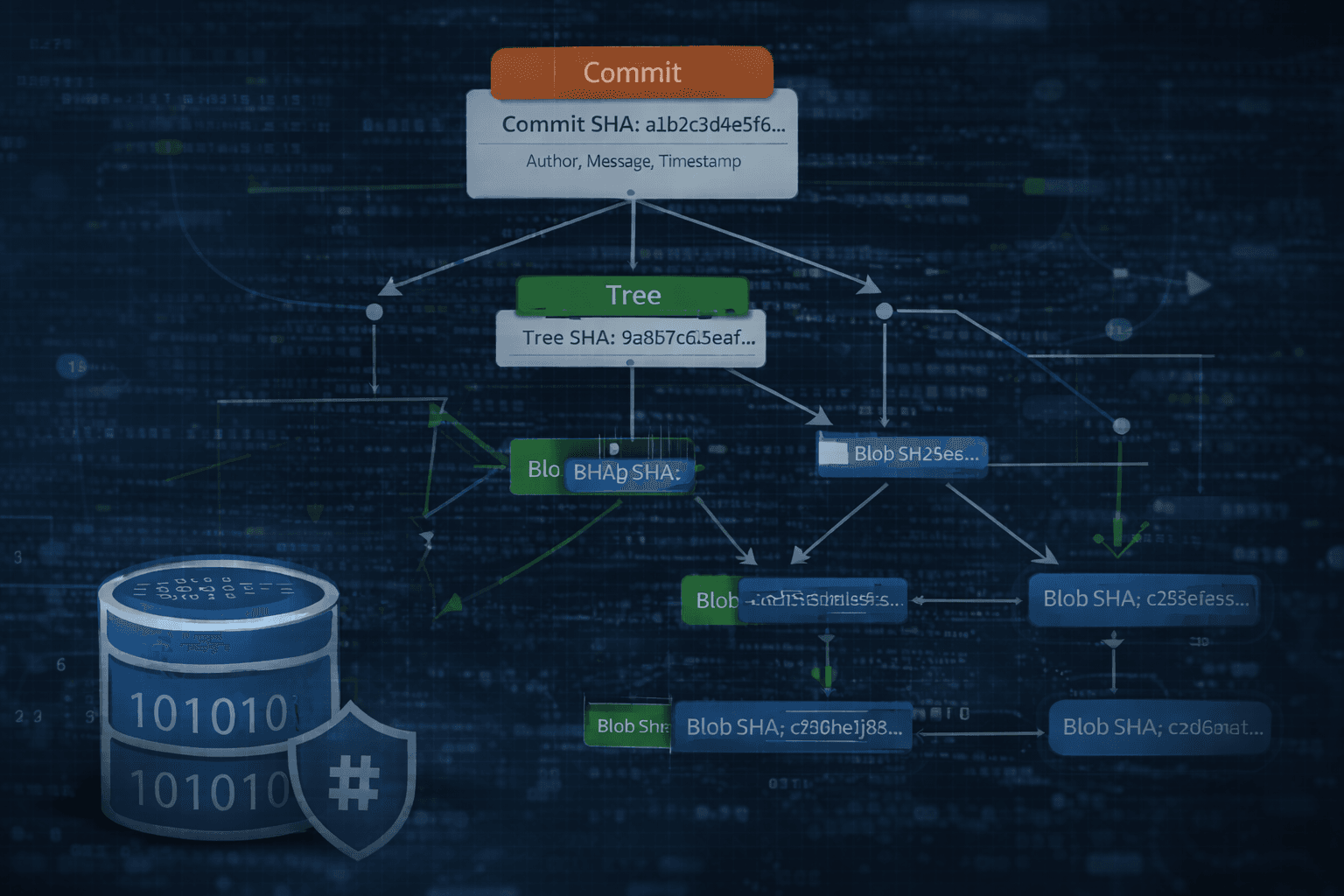
Git is a carefully designed content-addressable system built around hashes, immutable objects, and lightweight pointers. To truly understand why branching is fast, why rebasing rewrites history, or why commits can’t be edited, we need to look inside Git’s internal model. Once you see how it stores and connects data, many of Git’s “mysterious” behaviors suddenly become logical.
How Git Works?
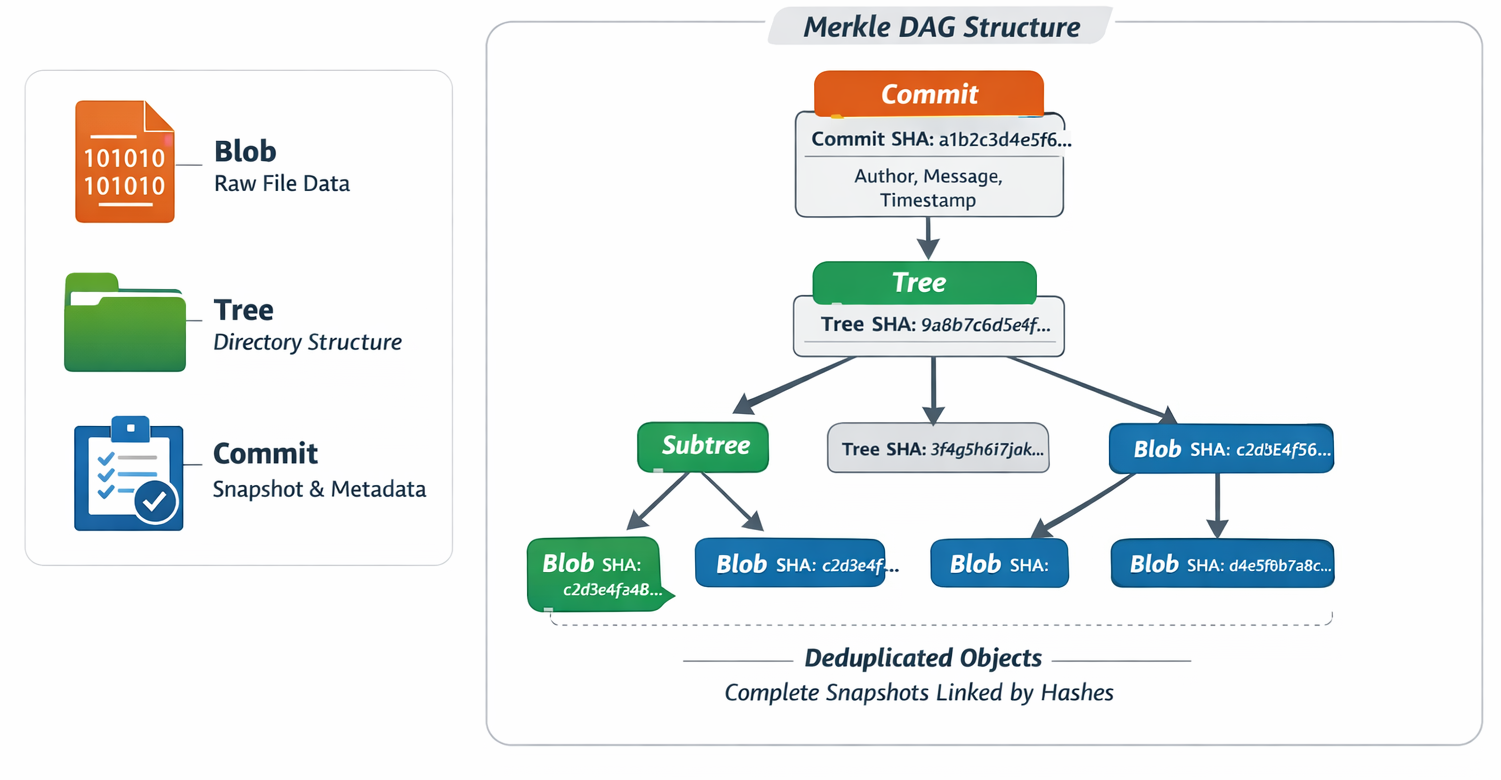
To really understand Git, we need to look at how it stores data internally. Git operates as a content-addressable filesystem at its core, storing everything in its object database (inside .git/objects/) as compressed, immutable objects identified by their SHA-1 hash (a 40-character hexadecimal string). The three key object types involved in tracking changes are:
Blob — Raw content of a file (no filename or metadata; just the bytes).
Tree — A directory snapshot: a sorted list of entries, each with mode (permissions), name, and SHA-1 hash pointing to a blob (file) or another tree (subdirectory).
Commit — A snapshot of the entire project at one moment, plus metadata.
These form a Merkle DAG (Directed Acyclic Graph) where commits point to trees, trees point to subtrees/blobs, and everything is deduplicated — unchanged files reuse the same blob/tree across commits. Git doesn’t store “changes.” It stores complete snapshots and connects them through parent references.
Commits Are Immutable
In Git, a commit is immutable because its identity is its SHA-1 hash, and that hash is calculated from its entire content: the root tree hash, parent commit hash(es), author info, timestamp, and message. If you change even one character in the commit message or modify a single file, the hash changes completely. That means you don’t “edit” a commit - you create a new one. The old commit still exists in the object database unless garbage-collected. Git history isn’t edited; it’s replaced with new snapshots that reference different hashes.
Branches Are Just Pointers
A branch in Git is not a folder of commits or a separate copy of code. It’s just a movable pointer (a reference) to a specific commit hash. When you commit on a branch, Git creates a new commit and simply moves that branch pointer forward to the new hash. That’s it. There’s no duplication of files or history. This is why branching in Git is cheap and instant — you're moving a pointer, not copying a project.
Detached HEAD
HEAD normally points to a branch, and that branch points to a commit. In a detached HEAD state, HEAD points directly to a commit instead of a branch. This usually happens when you checkout a specific commit hash instead of a branch name. If you make a commit in this state, Git creates it, but no branch pointer moves forward - meaning your new commit can become unreachable unless you create a branch from it. Detached HEAD isn’t an error; it just means you’re no longer advancing a named branch.
Reflog Records Pointer Movements
While commits are immutable and branches are pointers, the reflog is Git’s safety net that records where those pointers have been. Every time HEAD or a branch reference moves (commit, merge, rebase, reset, checkout), Git logs that movement locally in .git/logs/. Even if you “lose” a commit via reset or rebase, the reflog still remembers the previous position of the branch. That’s why you can recover seemingly deleted commits using git reflog - it’s not magic, it’s pointer movement history.
How Git Looks Up / Tracks Changes (git lookup / diff / status)
Git doesn't store traditional "deltas" for everyday commits (though packfiles later compress deltas for efficiency). Instead, it compares snapshots:
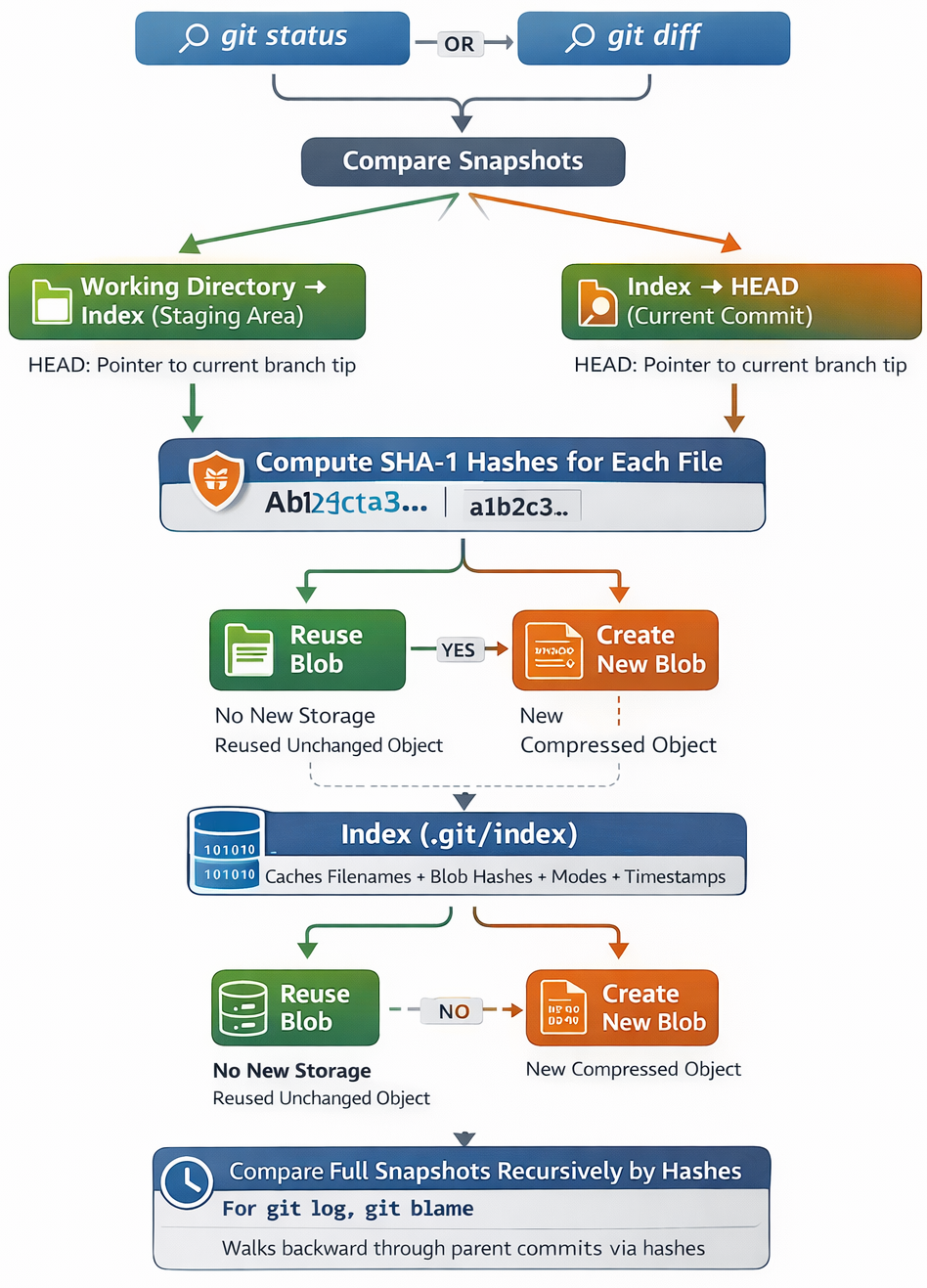
git status or git diff compares:
Working directory → index (staging area)
Index → HEAD commit (current branch tip), HEAD is just a pointer to a pointer.
To detect changes, Git computes SHA-1 hashes:
For each file in the working directory → potential new blob hash.
If the hash matches an existing blob (unchanged file), reuse it — no new storage.
If different → new blob created.
The index (.git/index) is a binary file caching filenames + their blob hashes + modes + timestamps. This makes lookups extremely fast: Git checks if file content hash changed since last add/commit.
For history lookup (e.g., git log, git blame): Git walks backward from a commit → parent commit → parent… using the parent pointers stored in commit objects. To show what changed between two commits, Git compares their root trees recursively (very efficient due to hashing — if subtree hashes match, that whole subtree is identical).
In short: Git tracks changes by comparing full snapshots via hashes, not by storing line-by-line diffs (though git diff computes them on demand). Modern Git versions are gradually introducing support for SHA-256 as a stronger hash alternative.
How git commit Works Internally
When you run git commit -m "message":
Git takes the current index (staging area) as the source of truth — not the working directory.
It builds a tree structure from the index:
For every staged file → ensure its blob exists (created during git add).
Recursively create tree objects for directories, linking to blobs/subtrees.
Produce one root tree object representing the entire project snapshot.
Git creates a new commit object containing:
tree <root-tree-hash> — pointer to the snapshot
parent <parent-commit-hash> (usually one; can be multiple for merges)
author Name <email> timestamp timezone
committer Name <email> timestamp timezone (often same as author)
Commit message
(optionally GPG signature)
The commit object gets its own SHA-1 hash (based on its content).
Git updates the current branch ref (e.g., .git/refs/heads/main) to point to this new commit hash.
Result: A new immutable snapshot is recorded. Unchanged files/directories share identical blob/tree objects from previous commits → very efficient storage.
How Pushing to a Remote Works (git push)
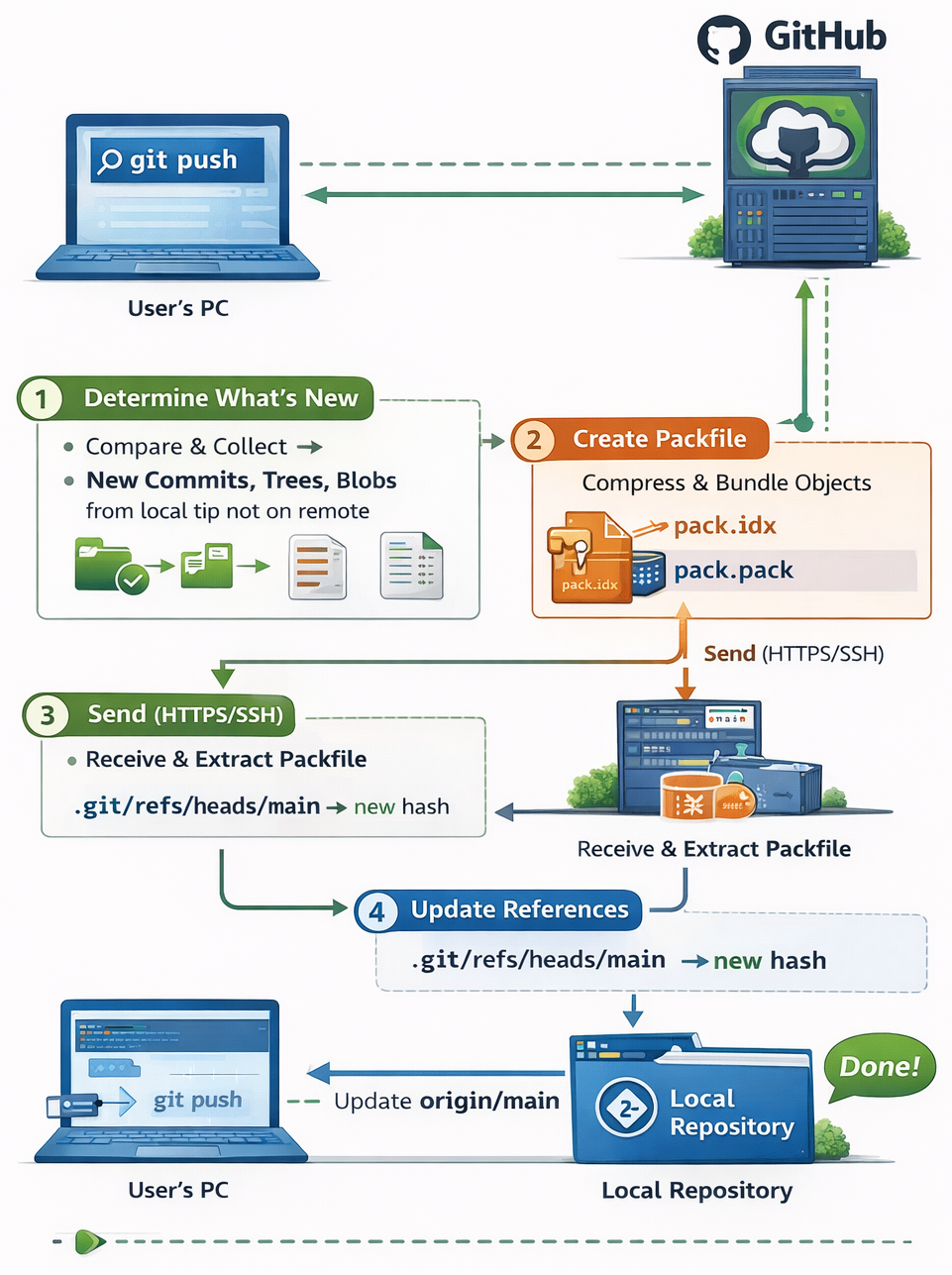
git push transfers objects and updates remote references:
Git determines what to send:
Compares local branch tip (e.g., main) with remote-tracking branch (e.g., origin/main).
Finds all commits reachable from your local tip but not from the remote tip (the "new" commits).
Collects all missing objects:
New commits, their root trees, all subtree trees, and all blobs referenced by those trees (even if some blobs existed before — remote might not have them).
Packs objects efficiently:
Creates a packfile (.pack + .idx) — a compressed binary format.
Uses delta compression: similar objects are stored as deltas against a base object (great for versioned source code).
Packfile is much smaller than loose objects.
Uploads via protocol (usually HTTPS or SSH):
Sends the packfile + a list of ref updates (refspecs, e.g., refs/heads/main:refs/heads/main).
Remote checks if it can accept (non-fast-forward? force? permissions?).
If accepted, remote:
Unpacks or stores the packfile in its object database.
Updates its ref (e.g., refs/heads/main) to the new commit hash.
Your local repo updates remote-tracking branches (origin/main) to match.
Why Rebasing Rewrites History
Rebasing rewrites history because it creates entirely new commit objects. When you rebase, Git takes your existing commits, re-applies their changes on top of a new base commit, and generates new commit hashes for each one. Since commit hashes depend on parent hashes, changing the base automatically changes every descendant commit’s identity. The result looks similar in content, but structurally it’s a different chain of commits - which is why rebasing changes history and should not be done on shared public branches.
In everyday terms:
git add → hashes content → creates blobs → updates index
git commit → builds trees → creates commit object → moves branch pointer
git push → sends missing objects (usually in a smart pack) + "move remote branch pointer to this commit"
At its core, Git is a snapshot graph powered by cryptographic hashes and movable references. It doesn’t store changes - it stores complete snapshots and connects them through parent links. Commits are immutable, branches are just pointers, and operations like rebase or push work by creating new objects and moving references.