Loading blog post...
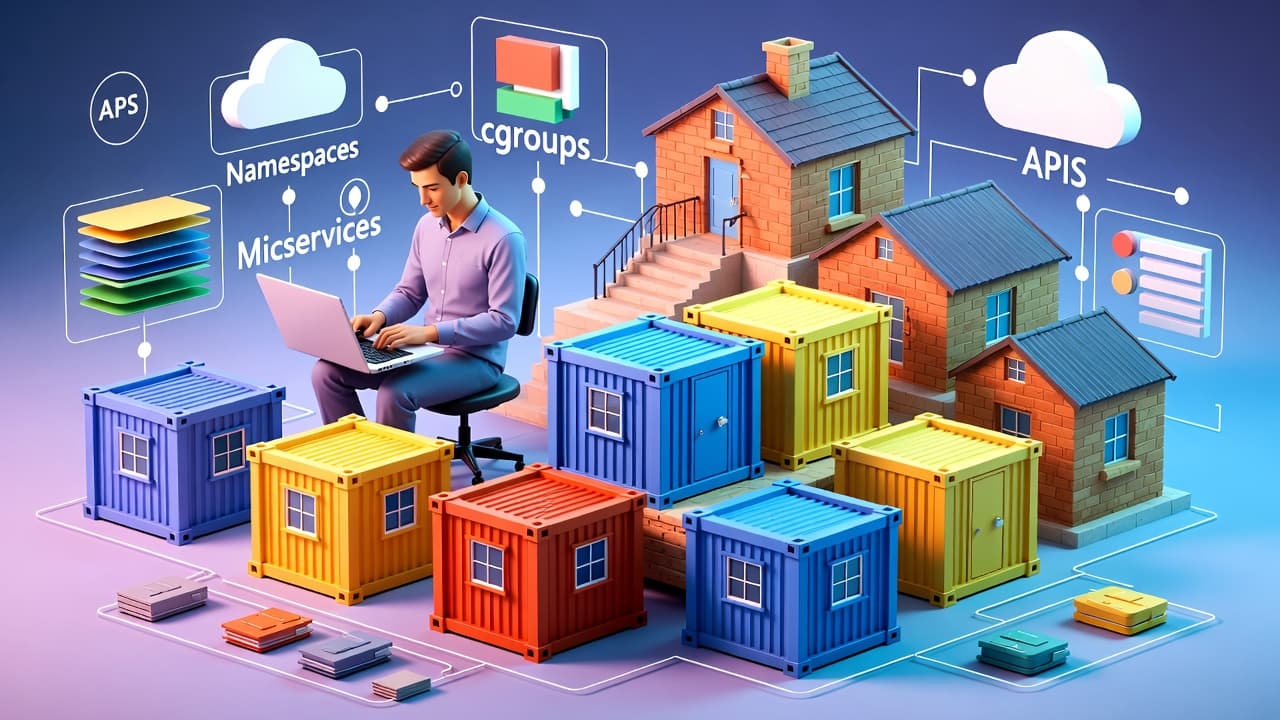
Imagine you're packing for a trip. Instead of throwing everything into one big suitcase where items get tangled, you use smaller, self-contained bags: one for clothes, one for toiletries, one for electronics. Each bag has everything it needs to function independently, but they all fit neatly into your main luggage.
In software terms, a container is like one of those bags. It's a lightweight, standalone package that bundles an application (like a web server or database) along with all its dependencies—libraries, configuration files, and even a slimmed-down operating system. This package runs consistently on any machine, whether it's your laptop, a colleague's server, or a cloud provider.
Unlike traditional setups where apps share the host's OS and can conflict (e.g., one app needs Python 3.8, another needs 3.10), containers isolate everything. They use the host's kernel (the core of the OS) but create virtual environments that feel like separate mini-machines. Tools like Docker make this possible without the overhead of full virtual machines (VMs), which are heavier and slower.
What Is a Container?
A container is a lightweight package that bundles an app with its dependencies (libraries, configs, and a minimal OS). It runs consistently anywhere, isolating apps to avoid conflicts. Unlike heavy VMs, containers share the host's kernel for efficiency—think of them as portable "boxes" for software.
In simple words: Containers let you "ship" your app in a box that works everywhere, every time.
How Containers Work
1. The Basics of Virtual Machines (VMs)
VMs emulate entire computers virtually. VMs are great for running incompatible OSes but inefficient for scaling apps. Here's how they work:
Hypervisor Layer: A software (like Hyper-V or KVM) sits between the host OS/hardware and the VM. It allocates resources (CPU, memory, storage) to create "guest" machines.
Full OS Stack: Each VM runs its own full operating system, including a separate kernel (the core that manages hardware). For example, you could run a Windows VM on a Linux host.
Isolation: Achieved by hardware virtualization—each VM thinks it has its own dedicated hardware.
Overhead: High! Booting a VM means starting a whole OS, which can take minutes and consume lots of RAM/CPU (e.g., 2GB+ per VM).
Imagine VMs as separate houses on a plot of land (host hardware). Each house has its own foundation (kernel), walls (isolation), and utilities—fully independent but resource-intensive to build and maintain.
2. The Basics of Containers
Containers virtualize the user space (apps and libraries) but share the host's kernel. No full OS per container— that's the magic for speed and efficiency.
Key Technologies (Linux-Based, Since Docker Relies on Them):
Namespaces: Create isolated views of resources. For example:
PID namespace: Processes inside the container have their own IDs (e.g., process 1 is the app, not seeing host processes).
Network namespace: Container gets its own IP, ports, and routes.
Mount namespace: Filesystem appears isolated—container sees only its files.
User namespace: Maps users inside to non-root on host for security.
Control Groups (cgroups): Limit and monitor resources (CPU, memory, I/O) per container group. Prevents one container from hogging everything.
Union Filesystems (like OverlayFS): Layers files efficiently. Base image + changes = new image without copying everything.
Container Runtime: Docker Engine (or alternatives like containerd) orchestrates this using the host kernel.
Process Flow:
You define a Dockerfile (blueprint) or pull an image from Docker Hub.
docker build creates an image—a read-only template (like a snapshot).
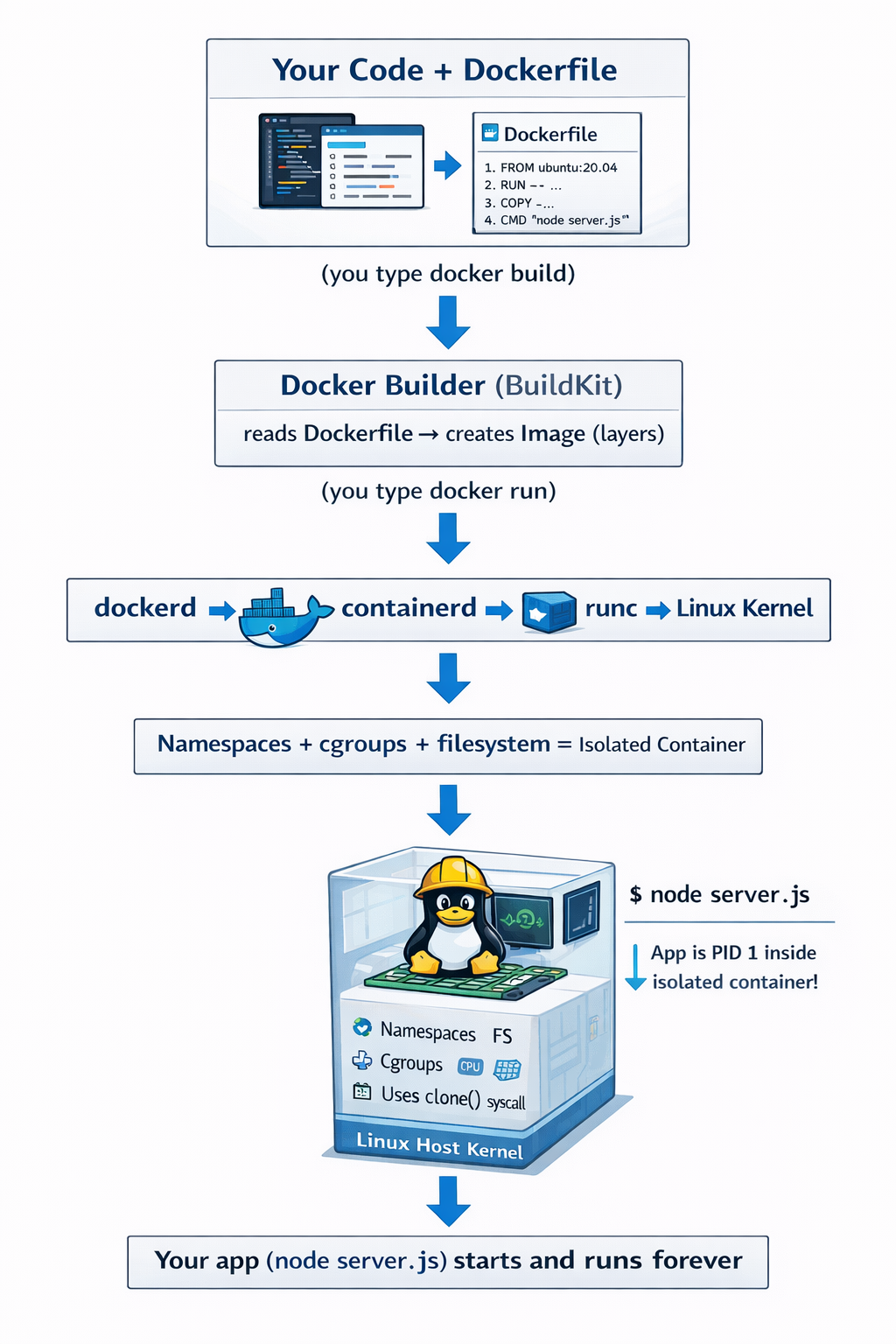
docker run starts a container from the image: It forks a process, applies namespaces/cgroups, and executes your app.
The container runs as a process on the host—visible via ps aux but isolated.
Isolation: Strong but not as absolute as VMs (shares kernel, so kernel vulnerabilities could affect all). However, it's secure enough for most apps with proper configs.
Overhead: Minimal! Starts in seconds, uses KB/MB extra per container (vs. GB for VMs).
Containers are like apartments in one building (host OS). They share the foundation (kernel) and utilities but have private rooms (isolated processes/files). Cheaper and faster to "build."
Now, let's see how an application gets Wrapped into a Container
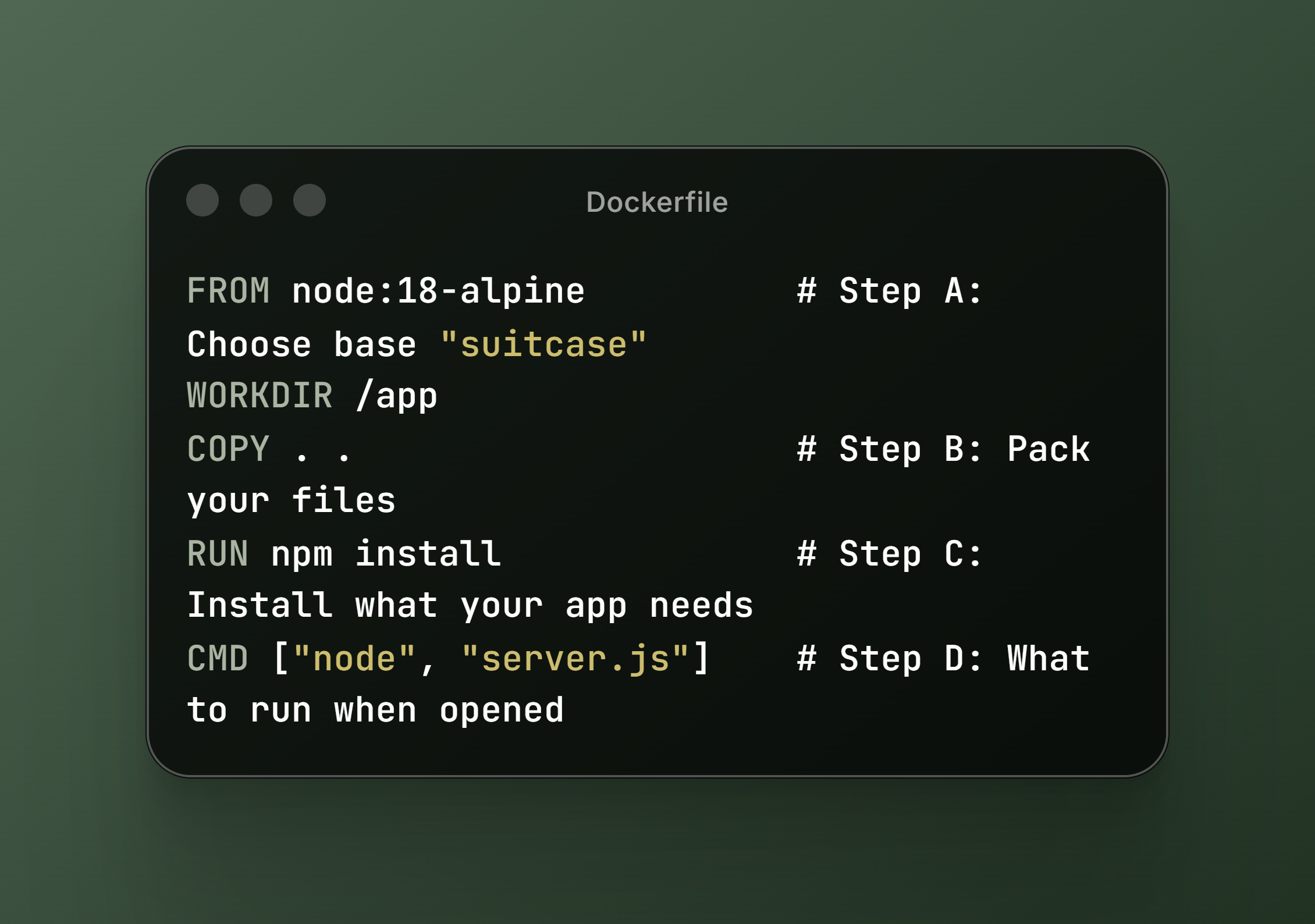
You write your app and a Dockerfile (a plain text "recipe"). (Important: The application itself never reads the Dockerfile. Your app is just normal code (server.js). It has no idea about Docker.)
You run:
docker build -t my-app .Who reads the Dockerfile? The Docker builder (called BuildKit in modern Docker, or the old builder).
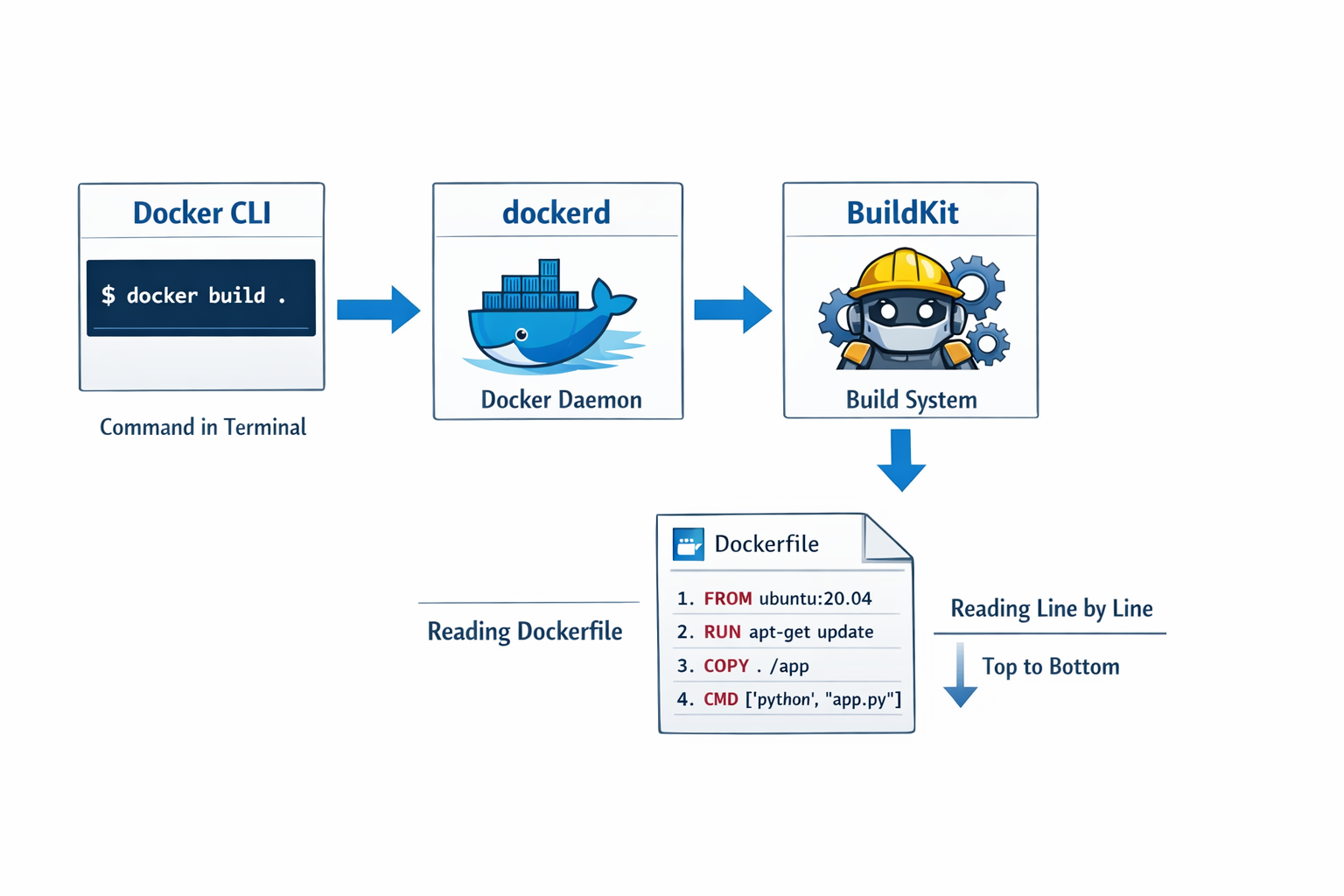
What happens inside the factory? - FROM node:18-alpine → Pulls (or uses cached) a ready-made base image. This is not an OS! It’s only a folder of files (Node.js, Alpine Linux tools, libraries). The real OS kernel stays on your host machine. Every instruction creates a layer (a frozen snapshot of changes) - COPY adds your code as a new layer then RUN npm install temporarily starts a mini-container, runs the command, then saves the result as another layer. At the end, BuildKit glues all layers together + adds metadata (CMD, ports, etc.) → creates one Docker Image (a read-only package). Result: A small, portable .tar-like file (stored in /var/lib/docker/overlay2 on Linux).
No New OS Is Created – Ever! This is the biggest confusion. VMs create a full guest OS + kernel. Containers do not. Your container always uses the exact same Linux kernel as your host (or Windows kernel on Windows). The base image only provides the "userland" (files, bash, Python, Node, etc.).
Docker Run – Unwrapping and Starting the App. You run -
docker run -p 3000:3000 my-app. what happend next? See the picture below.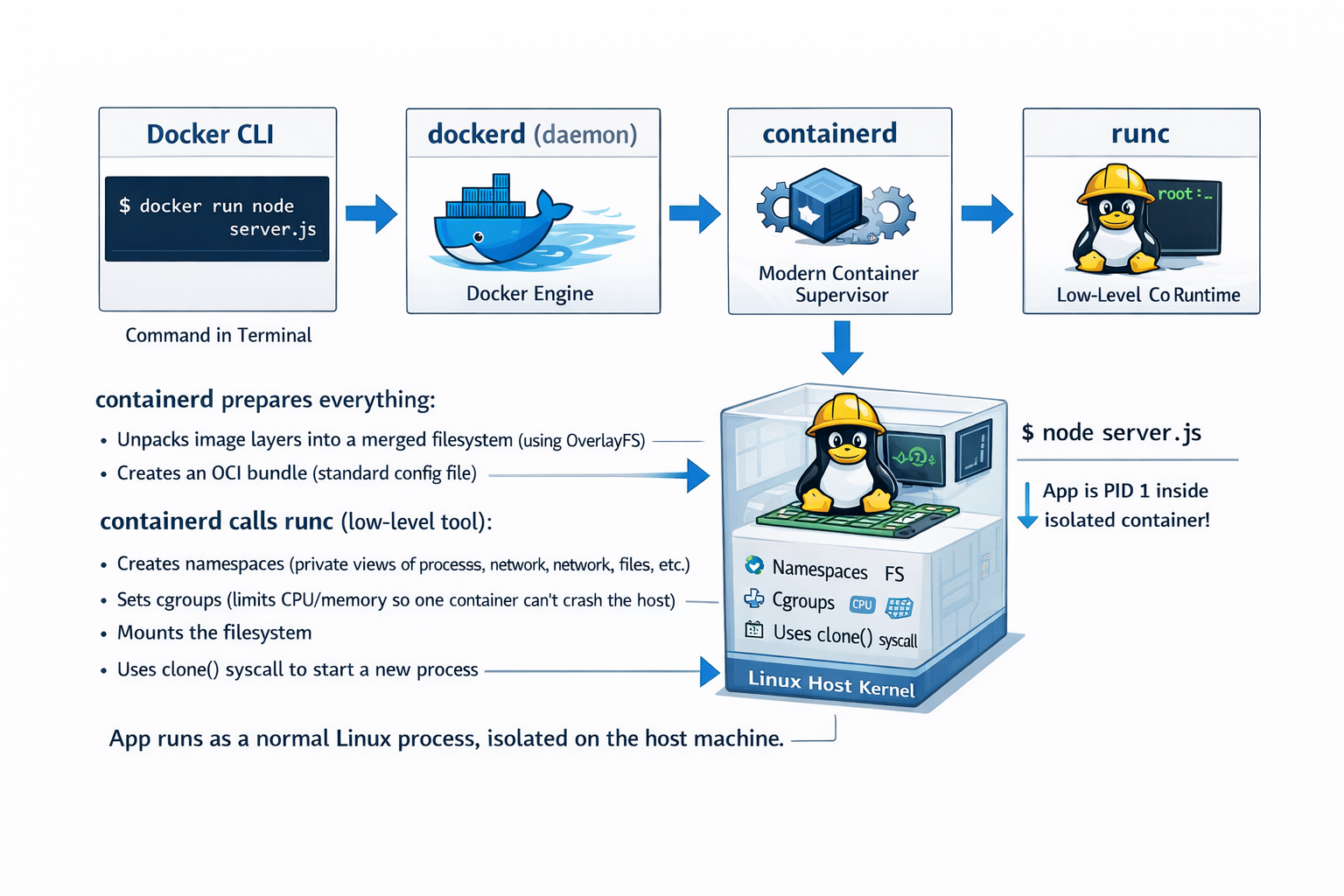
The app now runs as a normal Linux process on your host machine - but completely isolated
Why Do We Need Containers?
Software development used to be a nightmare of "it works on my machine" excuses. Developers would build an app on their local setup, only for it to break in testing or production due to differences in environments—like varying OS versions, missing libraries, or incompatible software.
Containers solve this by standardizing the runtime environment. Here's why they're a big deal:
Consistency Across Environments: Develop locally, test in staging, deploy to production—all identical.
Efficiency: Containers are fast to start (seconds vs. minutes for VMs) and use fewer resources since they share the host kernel.
Scalability: Easily spin up multiple instances of your app to handle more users, like duplicating those travel bags.
Isolation: Apps don't interfere with each other, reducing security risks and bugs from shared dependencies.
Portability: Move your app between clouds (AWS, Google Cloud, Azure) or on-prem servers without reconfiguration.
Think of containers as the "USB of software"—plug and play, no fuss.
The Real-World Impact of Containers
Containers have revolutionized how we build, deploy, and manage software. Here's the ripple effect:
Faster Development Cycles: Teams iterate quicker without environment headaches, leading to more frequent releases. Companies like Netflix and Spotify deploy updates multiple times a day thanks to this.
Cost Savings: By optimizing resource use (no idle VMs), organizations cut infrastructure costs by 50-70% in some cases. Cloud bills shrink because you're not over-provisioning.
Improved Collaboration: Developers, ops teams, and testers work from the same playbook, reducing silos and "finger-pointing."
Innovation Boost: Microservices architectures thrive on containers, allowing apps to be broken into small, independent pieces that scale individually.
Industry Transformation: From startups to enterprises, containers power modern tech. Kubernetes (which orchestrates containers) is now the backbone of cloud-native apps, handling everything from e-commerce to AI workloads.
In essence, containers have made software more reliable, agile, and affordable, fueling the explosion of cloud computing and DevOps practices.
Spotlight on a Common Container Technology: Docker
While there are several container technologies (like Podman, containerd, or LXC), Docker stands out as the most widely used. Docker is an open-source platform that automates the deployment of applications inside containers.
At its core, Docker provides:
Docker Engine: The runtime that builds and runs containers.
Dockerfile: A simple text file with instructions to assemble your container image (like a recipe).
Docker Hub: A public registry to share and download pre-built images (think GitHub for containers).
Docker didn't invent containers (that credit goes to Linux features like cgroups and namespaces), but it made them accessible to everyone. It's like how smartphones existed before the iPhone, but Apple made them user-friendly.
Why Is Docker So Popular?
Docker's rise to fame isn't accidental. Here's what sets it apart:
Ease of Use: Commands like docker run hello-world get you started in minutes. No PhD required.
Vast Ecosystem: Millions of ready-to-use images on Docker Hub for everything from databases (MySQL, MongoDB) to web frameworks (Node.js, Django).
Community and Support: Backed by a huge open-source community, plus enterprise tools from Docker Inc. It's free for basics, with paid features for teams.
Cross-Platform: Works on Windows, macOS, Linux, and integrates with tools like Kubernetes for orchestration.
Adoption by Giants: Used by Google, Amazon, Microsoft, and more. If it's good enough for them, it's probably good for you.
Innovation Driver: Docker popularized the "container as code" idea, where infrastructure is versioned like software.
In short, Docker democratized containers, turning a complex concept into something developers love using daily.
A simple Dockerfile looks like this (for a Node.js app):
How to Think About Containerized Applications
Containerization isn't just a tool—it's a way of thinking. Here's how to reframe your approach:
App as a Package: Stop thinking of your app as files scattered on a server. Instead, view it as a self-contained unit. Ask: "What does my app need to run? Bundle it all."
Immutable Infrastructure: Containers are disposable. Don't modify a running container; build a new image with changes. This ensures reproducibility—like baking a new cake instead of tweaking a half-eaten one.
Layered Thinking: Docker images are built in layers (base OS, then dependencies, then your code). This caches steps for faster builds.
Environment Parity: Design so your local dev setup mirrors production. Use Docker Compose for multi-container apps (e.g., app + database).
Security First: Containers isolate, but scan images for vulnerabilities and use minimal base images (e.g., Alpine Linux) to reduce attack surfaces.
Scale Horizontally: Instead of beefing up one server, add more containers. Tools like Docker Swarm or Kubernetes handle this.
Containers represent one of the most transformative shifts in modern software development. By packaging applications with everything they need to run—code, dependencies, configurations—into lightweight, portable, and isolated units, containers eliminate the age-old "it works on my machine" problem and deliver true environment consistency from a developer's laptop to massive production clusters. Unlike traditional virtual machines that emulate entire operating systems at great cost in resources and startup time, containers cleverly share the host kernel while using namespaces, cgroups, and layered filesystems to provide near-perfect isolation with minimal overhead. Docker, by making this powerful Linux technology approachable through simple commands, a declarative Dockerfile, and an enormous public ecosystem, turned containers from a niche concept into an industry standard. The result is faster iteration, dramatic cost savings, seamless collaboration across teams, effortless scaling, and the foundation for cloud-native architectures powered by Kubernetes and microservices.